
Set up a commission agent
A commission agent is a customer who earns a share of the revenue of other accounts or resellers without reselling anything. After every billed call of an assigned account or reseller, the switch credits the agent’s balance with the commission and records it. This tutorial makes a partner the commission agent of one account and one reseller. Allow about 15 minutes. For when to use a commission agent instead of a reseller, see Commission models.
Before you start
Section titled “Before you start”- You have Administrator access to the panel.
- The partner exists as a reseller directly under you, created in My Customers → Resellers. See Customers.
- The partner has the same base currency as the accounts and resellers it will earn on.
Who can be an agent
Section titled “Who can be an agent”The Commission Agent list offers only your own direct resellers in the same currency as the account or reseller you are editing; a reseller cannot be its own agent. Accounts cannot be agents.
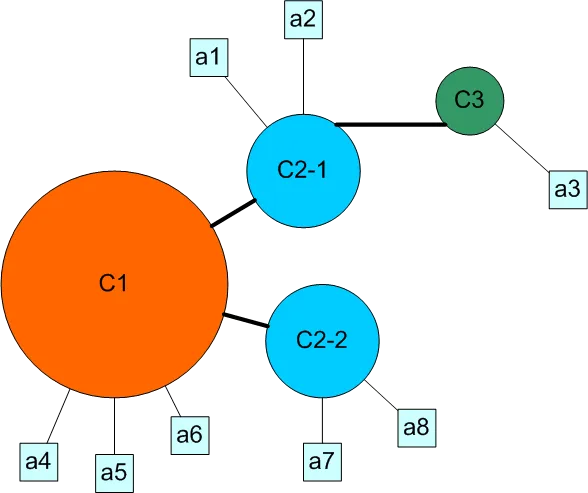
Logged in as C1 in the tree above:
- C2-2 can be the agent of the accounts a4, a5 or a6.
- C2-2 can be the agent of the reseller C2-1. It then earns on every call C2-1 is billed for, which includes the calls of a1, a2 and of a3 under C3.
- C3 cannot be anyone’s agent for C1, because it is not a direct reseller of C1. C2-1 can make it the agent of a1 or a2 in its own panel.
How the commission is calculated
Section titled “How the commission is calculated”The commission is the cost of the call billed to the account or reseller, multiplied by Commission Size. A call billed at 0.50 with a size of 10 gives the agent 0.05.
- A positive size credits the agent’s balance. The commission is recorded as a CDR of the agent with a negative cost: money added, not charged.
- A negative size, for example
-10, debits the agent’s balance by the same share instead. - Calls that cost nothing produce no commission.
The commission is a share of the revenue, not of your margin, and you pay it. Price the tariff so that it covers both.
Step 1: Assign the agent to an account
Section titled “Step 1: Assign the agent to an account”- Open My Customers → Accounts and open the account.
- Select the Advanced tab.
- Under Service / Payment select Commission Agent: the partner.
- Enter Commission Size (%):
10for 10%. - Click Save.
Result: every billed call of the account credits the partner with 10% of its cost.
Step 2: Assign the agent to a reseller
Section titled “Step 2: Assign the agent to a reseller”- Open My Customers → Resellers and open the reseller.
- Select the Commission tab.
- Select Commission Agent: the partner. Commission Size, % becomes editable.
- Enter Commission Size, %, for example
5. - Click Save.
Result: the partner earns 5% of what the reseller is billed for its whole traffic.
Step 3: Test it
Section titled “Step 3: Test it”- Make a test call from the account and note its cost in Reports → Call Records (CDRs).
- Open My Customers → Resellers and click Actions → Login as for the partner.
- In the partner’s panel open Reports → Commissions Reports, select the Commission Source and today’s period, and click Update Report.
- Check that Commission Earned in the row of the account is the call cost multiplied by the size. Current Balance in that row is the balance of the account, not of the partner.
- Back in your own panel, check in My Customers → Resellers that the partner’s balance grew by the same amount.
The Commissions Reports item appears in the partner’s menu as soon as it is the agent of at least one account or reseller.
What’s next
Section titled “What’s next”- Commission models: commission agent or reseller.
- Reports: the commissions report and the other reports.
- Customers: pay the earned balance out with Add Balance → Manual Charge.