
Routing
Routing answers one question for every call: which vendor connections can terminate it, and in which order to try them. The answer comes from the Routing Group of the account, and the order from the group’s routing policy. Because the switch tries connections one after another, routing also defines your failover.
How it works
Section titled “How it works”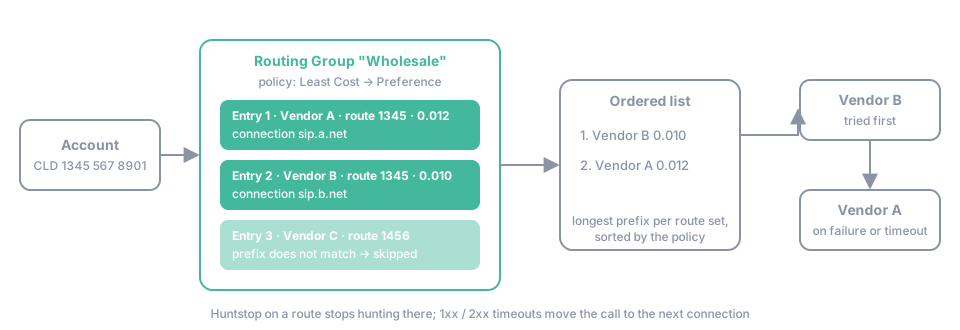
-
Find the routing group. The switch takes the routing group of the account, or of the authentication rule when the rule overrides it.
-
Match the routes. Every entry of the routing group pairs a Connection with a Termination Route (a set of prefixes with the vendor’s prices). For each entry the switch selects the route with the longest prefix that matches the called number. Entries whose route set has no matching prefix are skipped. For the number
1234567890and two route sets with prefixes1,12and123,1234, the routes12and1234are selected. -
Order the list. The selected routes are sorted by the Routing Policy of the group. A policy is a sequence of criteria applied one after another:
Criterion Order Least Cost cheapest termination price first Prefix Length longest matching prefix first Route Preference highest Preference of the route first Routing Entries Order lowest Order # of the entry first Weighted Distribution random, in proportion to the Weight of the entries; entries without a weight keep their position -
Hunt. The INVITE goes to the first connection. The switch moves to the next one when the vendor answers with a failure, when Reply Timeout of the connection, 1xx Timeout or 2xx Timeout of the route expires, or when the connection is at its Capacity or Max CPS. The last entry gets the longer Final 2xx Timeout of the group. The first connection that answers takes the call; if none does, the caller receives the last failure code.
Three settings on a route change the hunting: Forbidden excludes the prefix from that connection altogether, Huntstop stops hunting after this connection and returns its failure to the caller, and Activation Date / Expiration Date let you load next month’s prices in advance. See Bulk upload and activation dates.
Quality monitoring can reorder the list automatically: a connection whose ASR, ACD or PDD falls below the thresholds set on the connection is moved to the end or blocked until a retry batch shows that it recovered. See Quality-based routing.
Key terms
Section titled “Key terms”- Routing Group — an ordered set of vendor connections and termination routes used to route a call.
- Route — one candidate path for a call: a vendor connection with its priority and cost.
- Destination Set — a termination route: a set of prefixes with the vendor’s prices, attached to a connection inside a routing group.
- LCR — least cost routing: the policy that orders routes by termination price.
- Connection — a SIP gateway of a vendor with its own host, authentication and capacity.
- ASR / ACD / PDD — answer-seizure ratio, average call duration and post-dial delay: the quality metrics measured per connection.
Common scenarios
Section titled “Common scenarios”Two vendors cover the same prefix, one is cheaper and one is better
Section titled “Two vendors cover the same prefix, one is cheaper and one is better”Set the policy to Least Cost and the cheaper vendor is tried first with the better one as failover. Set it to Route Preference and give the better vendor a higher Preference on the route to send traffic there first and only fall back to the cheaper one. Combine both to use preference only where you set it: Route Preference → Least Cost.
Split traffic 70/30 between two vendors
Section titled “Split traffic 70/30 between two vendors”Use Weighted Distribution with Weight 7 and 3 on the two entries. The distribution is random per call, so the proportion holds over many calls, not for every ten calls. See Weighted distribution and How do I split traffic by percentage?.
Calls to a prefix must never go to a particular vendor
Section titled “Calls to a prefix must never go to a particular vendor”Add the prefix to that vendor’s termination route with Forbidden checked. The switch skips the connection for that prefix even if it is the only one; use Huntstop instead when you want the call to fail there rather than overflow elsewhere.
A vendor is down and every call waits before failing over
Section titled “A vendor is down and every call waits before failing over”The route’s 1xx Timeout (default 10 s) and 2xx Timeout (default 60 s) run from the moment the INVITE is sent, together with the connection’s Reply Timeout (default 5 s). Lower the reply and 1xx timeouts on connections that are expected to answer quickly, and let quality monitoring block the connection automatically. See Call timeouts.