
Authentication
Authentication is the first thing the switch does with a new call: it decides which Account the call belongs to. The account then supplies everything else, the tariff, the balance and the routing group. A call that cannot be matched to an account is rejected before it costs anything, and it leaves no CDR.
How it works
Section titled “How it works”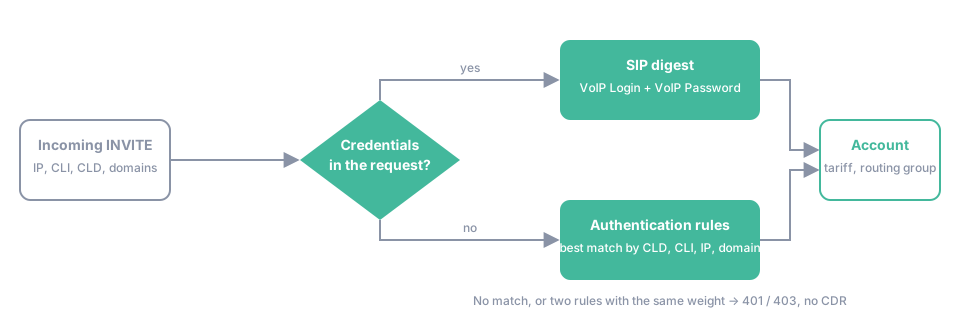
FlySIP has two methods, and one account can use both at the same time.
SIP digest. The calling device sends a username and a password with the INVITE. The switch compares them with VoIP Login and VoIP Password of the accounts. This is the only method that lets a device register on the switch, which is needed to receive on-net calls and calls to DIDs. It is the method for softphones, IP phones and ATAs.
Authentication rules. The switch compares five attributes of the incoming call with the Authentication Rules of all accounts:
| Attribute | Rule field | Matching |
|---|---|---|
| Remote IP address | Remote IP Address | exact |
| Calling number | Incoming CLI/ANI | exact, or a pattern with * (any tail) and ? (any one digit) |
| Called number | Incoming CLD/DNIS | exact, or the same patterns |
To header domain |
To Domain | exact, or a suffix with a leading * |
From header domain |
From Domain | exact, or a suffix with a leading * |
A rule matches when every field that is filled in matches the call; empty fields match anything. Protocol is always set: SIP for ordinary traffic, Calling Card PIN for rules that are checked when an IVR asks for a card number.
When several rules match, the switch picks the most specific one:
- A rule with a matching CLD beats every rule with an empty CLD. Among those, a matching CLI beats an empty CLI, then Remote IP, then To Domain, then From Domain.
- For numbers, an exact value beats a pattern, a pattern with
?only beats a pattern with*, and between two patterns the one with more literal digits wins. - For domains, an exact domain beats a suffix, and the longer suffix wins. Suffix matching is literal:
*.example.commatchessip.example.combut notexample.com.
Two rules that are equally specific make the call ambiguous. The switch answers 401 Unauthorized and only digest authentication can still succeed. Installations upgraded from older versions may still use the legacy weight-based order; the system parameter system/sip/authentication/attr_order selects between default and old_style.
A rule can carry its own Tariff and Routing Group under Advanced Parameters. They override the account’s settings for calls matched by that rule, so one account can hold several price levels, for example per originating IP. Max Sessions and Max Calls Per Second on a rule cap the traffic from that source.
Key terms
Section titled “Key terms”- Account — a SIP identity (username/password or IP) owned by a customer that originates and receives calls and carries its own balance.
- Authentication Rule — a rule that maps incoming calls to an account by remote IP, CLI, CLD or domain.
- CLI — the calling number (ANI) presented with the call.
- DID — a phone number that terminates on the switch and is assigned to an account or an IVR application.
- Trunk — a SIP connection from a customer’s PBX that sends calls without registering.
Common scenarios
Section titled “Common scenarios”A wholesale customer sends calls from a fixed IP
Section titled “A wholesale customer sends calls from a fixed IP”One rule with Remote IP Address only. Add a second rule with the same IP and a CLI pattern if the customer wants a different tariff for part of their traffic. This is the setup of Quickstart: wholesale and of IP-to-IP authentication.
One IP sends traffic for several customers
Section titled “One IP sends traffic for several customers”The vendor that delivers the calls uses one gateway for everybody, so the IP alone is ambiguous. Give each account a rule with the IP plus the CLI prefix or the To Domain that identifies the customer. Rules with a CLI are preferred over rules with the IP alone, so a catch-all rule for the gateway can stay in place.
Incoming calls to a DID must reach a registered phone
Section titled “Incoming calls to a DID must reach a registered phone”Combine both methods. The phone registers with digest credentials. The DID is a rule on the same account with Incoming CLD/DNIS set to the number, and optionally Remote IP Address set to the gateway of the DID provider. The call is authenticated to the account by the rule and delivered to the registered device. See Create a DID and assign it to an account.
Blocking a few destinations for one account
Section titled “Blocking a few destinations for one account”A rule whose Incoming CLD/DNIS matches the destination and that leads to a tariff where the prefix is marked Forbidden blocks those calls. Calls rejected by authentication return 403 and are not written to the CDRs. For long lists use Rules & Lists or a DNC List instead; they are made for this and keep the rules readable.