
Number translation
Number translation rewrites the calling number (CLI) and the called number (CLD) of a call while it passes through the switch. Customers dial in their own habits: with 00, 011, a +, a national format or a technical prefix. Vendors want numbers in their own format too. Translation rules turn the customer’s format into one internal format before rating and routing, and the internal format into each vendor’s format on the way out. Your tariffs and termination routes then need one set of prefixes.
How it works
Section titled “How it works”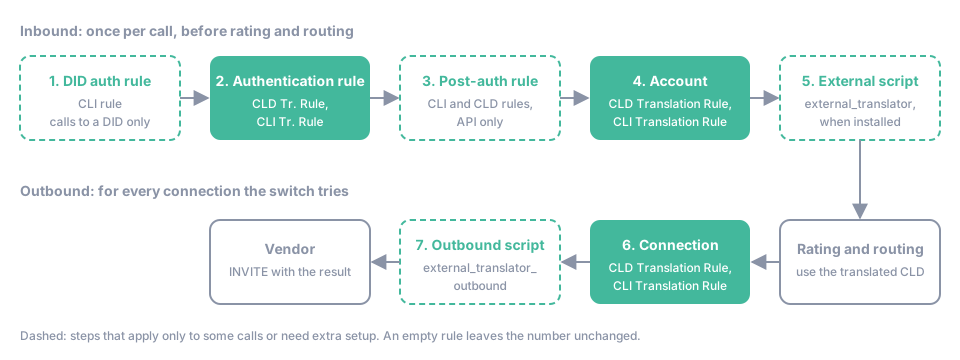
A translation rule is a text field on several objects. The switch applies them in a fixed order, and every step works on the result of the previous one.
- DID authentication rule. A call that arrives on a DID from your DID provider gets the CLI Translation Rule of the matching rule in the DID Pool.
- Authentication rule. A call authenticated by a rule of the account gets the rule’s CLD Tr. Rule, then its CLI Tr. Rule.
- Post-authentication rule. When the account has a post-authentication rule that matches the remote IP, CLI or CLD (as rewritten so far), its CLI and CLD rules apply. These rules are managed through the API only. See Post-authentication rules.
- Account. The account’s CLD Translation Rule, then its CLI Translation Rule. An account class can preset both when you create accounts. For a call to a DID the CLD is then replaced by the DID number, rewritten by the DID Translation Rule of the DID, so the account’s CLD rule has no effect on such calls; its CLI rule does.
- External script. If an executable
external_translatoris installed for the environment, it receives the numbers and can change them, add a cost or reject the call. See Rewrite the CLI and CLD with an external script.
The CLD that comes out of step 5 is the number the switch rates and routes. The switch then tries the connections of the routing group one by one, and for each connection:
- Connection (step 6 in the diagram). The connection’s CLD Translation Rule and CLI Translation Rule rewrite the numbers sent to that vendor. Each connection starts from the same internal numbers, so one connection’s rule never affects the next connection.
- Outbound script (step 7). If an executable
external_translator_outboundis installed, it gets the last word on the CLI and CLD sent to the vendor.
A few more rules use the same syntax for other values: P-Asserted-Id Translation Rule of the account and Identity Tr. Rule of the connection for the caller identity headers, Diversion Header Tr. Rule of the connection, and LRN Translation Rule of the routing group for the result of a number portability lookup.
| Object | Fields | Where to set them |
|---|---|---|
| DID | DID Translation Rule, CLI Translation Rule of each authentication rule | DIDs & IVR Apps → DID Pool. See DID Pool |
| Authentication rule | CLD Tr. Rule, CLI Tr. Rule | Actions → Authentication Rules of the account. See Accounts |
| Post-authentication rule | cli_translation_rule, cld_translation_rule |
XML-RPC API. See Manage post-authentication rules |
| Account | CLD Translation Rule, CLI Translation Rule | The account form. See Accounts |
| Account class | CLD Tr. Rule, CLI Tr. Rule | My Customers → Account Classes |
| Connection | CLD Translation Rule, CLI Translation Rule | Number Translation of the connection form. See Connections |
Rule syntax
Section titled “Rule syntax”A rule is one of three things:
- Empty. The number stays as it is.
- A substitution that starts with
s/. It searches the number with a regular expression and replaces what it finds. - Anything else is a fixed value. The rule
123456replaces every number with123456, whatever it was.
Substitutions
Section titled “Substitutions”s/<pattern>/<replacement>/s/<pattern>/<replacement>/gWithout a flag only the first match is replaced; the g flag replaces every match. No other flag exists, and a rule with another letter after the last / is invalid. The pattern is a regular expression in Python syntax. It matches anywhere in the number unless you anchor it with ^ (start) or $ (end).
| Rule | Number | Result |
|---|---|---|
s/^011// |
01138056123456 |
38056123456 |
s/^/+/ |
442079460123 |
+442079460123 |
s/1/x/ |
1213 |
x213 |
s/1/x/g |
1213 |
x2x3 |
Put several substitutions into one rule by separating them with ;. They run left to right, each on the result of the previous one. Spaces around ; and a trailing ; are ignored.
| Rule | Number | Result |
|---|---|---|
s/^00//;s/^/+/ |
00442079460123 |
+442079460123 |
s/^44/222/;s/^2222/55/ |
442333222111 |
55333222111 |
The second example shows the catch: 44 becomes 222, and the new number starts with 2222, so the second substitution rewrites it again. When a later substitution must not see the output of an earlier one, mark the output with a character that never occurs in numbers and remove the mark at the end. See Several rules in sequence.
Regular expressions in short
Section titled “Regular expressions in short”| Element | Matches |
|---|---|
^, $ |
Start and end of the number |
. |
Any one character |
\d, \D |
A digit, a non-digit |
[0-5], [+#], [^0] |
One character from the set, or not from it |
{7}, {8,10}, {,9} |
Exactly 7, 8 to 10, up to 9 of the preceding element |
*, +, ? |
Zero or more, one or more, zero or one |
(…) |
A group you can reuse in the replacement |
a|b |
a or b |
(?!…) |
Only if the text that follows does not match |
\+, \., \* |
A literal +, . or * |
In the replacement, \1 to \9 insert the groups of the pattern. Write \g<1> when a digit follows the group: \g<1>0000 appends four zeros, while \10000 would ask for group 10.
Random digits
Section titled “Random digits”The replacement can contain ${R:[<characters>]<count>}. Every time the rule runs, the switch inserts <count> characters chosen at random from the list. The list holds single characters and ranges separated by commas; <count> defaults to 1. Several lists follow each other inside one macro.
| Rule | Possible result |
|---|---|
s/.*/${R:[0-3,6]5}/ |
16020: five characters from 0, 1, 2, 3, 6 |
s/.*/+17266${R:[0-9]8}/ |
+1726677763170 |
s/$/${R:[1-9]1[0-9]4}/ |
The number followed by one digit from 1 to 9 and four from 0 to 9 |
Limits
Section titled “Limits”- The
/character cannot appear in a pattern or a replacement, not even escaped: the switch splits the rule at every/. - A rule must be valid for every number. A pattern that does not compile or a replacement that refers to a missing group is an error even when the number would not match.
Test a rule
Section titled “Test a rule”The panel checks the syntax of a rule when you save the form and refuses an invalid one. To see what a rule does to a particular number:
- Call
applyTranslationRulewith the rule and a sample number. It returns the result without changing anything. - Open Tools & Debugs → Test Dialplan and simulate a call. Row
0of Routing Entries shows the CLI and CLD after the inbound rules of the account; every route row shows them after the connection’s rules.
Key terms
Section titled “Key terms”- Translation Rule — a regular-expression rule that rewrites the called or calling number before rating or routing.
- CLI — the calling number (ANI) presented with the call.
- Authentication Rule — a rule that maps incoming calls to an account by remote IP, CLI, CLD or domain.
- Connection — a SIP gateway of a vendor with its own host, authentication and capacity.
Common scenarios
Section titled “Common scenarios”Customers dial international numbers in different ways
Section titled “Customers dial international numbers in different ways”Pick one internal format, for example E.164 without +: 442079460123. Give each account or authentication rule a CLD rule that produces it: s/^011// for a customer in North America, s/^00// for one in Europe, s/^\+// for a PBX that sends +. Rates and termination routes then use prefixes such as 44 only.
Two vendors want the same number in different formats
Section titled “Two vendors want the same number in different formats”Leave the internal number alone and set the format per connection. A UK carrier that takes national numbers gets s/^44/0/ (02079460123), an international carrier that wants + gets s/^/+/ (+442079460123). A call that fails on the first connection reaches the second one with the second format.
A call fails with 403 Invalid CLD translation
Section titled “A call fails with 403 Invalid CLD translation”An inbound rule has an error. The number in brackets tells you where: (1) the authentication rule, (3) the account, (6) the post-authentication rule. The same holds for Invalid CLI translation, with (2) for the authentication rule, (4) the account and (5) the DID. An invalid connection rule does not fail the call; the switch skips that connection and tries the next one. See SIP response codes.