
Virtual environments
A virtual environment (also called a partition) is a complete, isolated FlySIP system inside your installation: its own administrator, customers, vendors, tariffs, routing and CDRs on the same softswitch hardware. Environments let you run a retail and a wholesale business apart, give a partner their own switch, or test a configuration without touching production.
How it works
Section titled “How it works”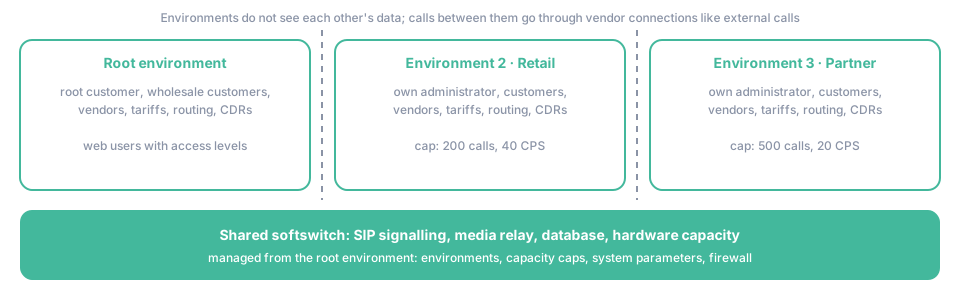
Shared. All environments run on the same softswitch: SIP signalling, media relay, database server, network interfaces and the hardware capacity are common. System-wide settings such as the firewall, TLS certificates and backups are managed once, from the root environment.
Separate. Everything an operator configures is per environment: the root customer and its web users, customers, accounts, vendors and connections, tariffs, routing groups, DIDs, IVR applications, CDRs and reports. An environment’s administrator sees nothing of the others. Calls between two environments are ordinary external calls: one environment’s vendor connection points at the other’s SIP address.
Managed from the root environment. The root customer of the root environment opens System Management → Environments to create, start, stop, suspend and delete environments. For each one it sets:
| Field | Meaning |
|---|---|
| Environment Name, Description | How the environment appears in the list |
| Web Address | The hostname of the environment’s own panel and API |
| Max Sessions, Max CPS | Caps on simultaneous calls and calls per second, so one tenant cannot consume the whole switch |
| Environment IPs | Signalling addresses assigned to the environment |
| Modules | Optional modules enabled for the tenant, such as Call Recording |
| Expiration Date, Notify On Expiration | For environments rented for a period |
Login Into in the Actions menu signs the root administrator into a tenant’s panel without knowing its password. FlySIP per-environment hooks (CLI translation, blacklists, number rewriting) live in a directory per environment and are applied by the switch only to that environment’s calls.
Environments cannot be nested, and each one consumes memory and CPU for its own services. Keep the number of environments on one server in the low tens, depending on the hardware.
Key terms
Section titled “Key terms”- Environment — an isolated partition of the switch with its own customers, vendors, tariffs and CDRs.
- Root customer — the top-level customer of an environment; all other customers and accounts belong to it directly or through resellers.
- Reseller — a customer that owns sub-customers and accounts and resells your service under its own tariffs, inside one environment.
- Admin panel — the web interface an environment’s administrator uses.
- XML-RPC API — the programmatic interface, served per environment at its web address.
Common scenarios
Section titled “Common scenarios”Separating retail from wholesale
Section titled “Separating retail from wholesale”Two environments with their own tariffs, routing and CDRs stop retail accounts from ever using wholesale routes and keep the reports of each business clean. The cost is double configuration: vendors and termination routes used by both have to be set up twice.
A reseller that wants its own switch
Section titled “A reseller that wants its own switch”A reseller inside one environment shares your vendors, routing groups and the system parameters; it manages only its customers, accounts and tariffs. An environment of its own gives the partner full control, including vendors and routing, at the price of a capacity cap and a separate login. Choose the reseller when they sell your routes, the environment when they bring their own.
Testing a new release or a risky configuration
Section titled “Testing a new release or a risky configuration”Create a small environment, cap it with Max Sessions and Max CPS, and point a test account at it. Nothing done there reaches production CDRs or balances. Delete the environment afterwards.