
Overview
FlySIP Softswitch is a VoIP billing platform: a softswitch that processes the calls and a white-label admin panel on top of it. The panel is what you work with every day; the switch, its database and the call-processing engine run underneath and expose every object, every CDR and every operation through the XML-RPC API.
Architecture
Section titled “Architecture”| Layer | Component | What it does |
|---|---|---|
| Softswitch | FlySIP call engine (B2BUA, RTP relay, rating engine, PostgreSQL) | Accepts and routes SIP calls, relays media, rates every call and writes the CDRs |
| Panel | FlySIP web (PHP, Smarty, Alpine.js, HTMX) | The admin panel and the self-care portals for customers, accounts and vendors |
| Extensions | FlySIP XML-RPC methods and per-environment hooks (Python) | Extra reports, firewall rules, callbacks, number rewriting, CLI lists |
The panel talks to the softswitch through the XML-RPC API for every change and reads reporting data from the switch database. Because the panel is only a front end, you can also automate your work against the same API. See the API overview.
One FlySIP installation can host several environments: isolated partitions with their own customers, vendors, tariffs and CDRs. The root customer of the root environment manages them on System Management → Environments. See Virtual environments.
Who logs in
Section titled “Who logs in”The login page asks for an account type. Each type sees a different panel:
| Account type | Who | What they see |
|---|---|---|
| Admin | You and your staff, resellers | The full admin panel: customers, accounts, vendors, tariffs, routing, reports, system management. Resellers see only their own objects. |
| Account | End users (a SIP account owner) | The self-care portal: own balance, rates, call records, payments, trunks |
| Vendor | Carriers you terminate to | Their connections, call records and reports |
Web users with restricted Access Levels can be created under System Management → Users for staff who need part of the admin panel only. See Web users and permissions.
The two sides of your business
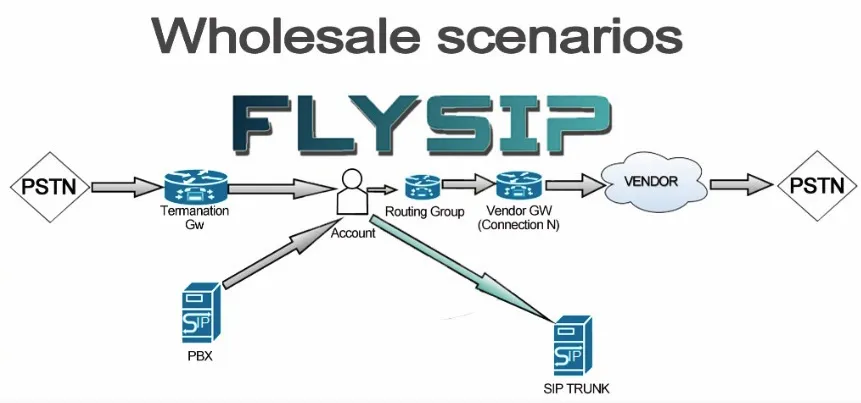
Section titled “The two sides of your business”Every call enters the switch from a customer and leaves it towards a vendor. The initial setup mirrors that split, and the quickstarts follow the same order.
Vendor-facing side: where calls go. Vendors, their connections (SIP gateways), termination routes (the prices your vendors charge you) and routing groups (which connection is tried first). This side determines your termination cost.
Customer-facing side: who sends calls and what you charge. Tariffs with rates, tariff plans, customers and their accounts, and the authentication rules that tell the switch which account a call belongs to. This side determines your revenue.
Objects you will configure
Section titled “Objects you will configure”| Object | Role | Panel menu |
|---|---|---|
| Vendor | A carrier you send calls to; billed in its own currency | Vendors |
| Connection | A SIP gateway of a vendor: host, port, authentication, capacity | Vendors → Connections |
| Termination Route | A set of destination prefixes with the price the vendor charges you (also called a destination set) | Vendors → Termination Routes |
| Routing Group | An ordered list of connections and termination routes that decides how a call is routed | Vendors → Routing Groups |
| Tariff | A price list for your customers: prefixes, intervals, prices | Tariffs & Currencies → Tariff Plans |
| Tariff Plan | A tariff plus billing rules: billing cycle, prepaid or postpaid, service charges | Tariffs & Currencies → Tariff Plans |
| Customer | A billable entity that owns accounts and receives invoices | My Customers → Resellers |
| Account | A SIP identity (login and password, or IP address) that originates calls and carries a balance | My Customers → Accounts |
| Authentication Rule | Tells the switch that calls from a given IP or CLI belong to an account | Accounts → Authentication Rules |
| DID | An incoming number that points to an account or an IVR application | DIDs & IVR Apps → DID Pool |
All terms used in this documentation are defined once in the project glossary and kept identical across languages.
Where to go next
Section titled “Where to go next”- First login: open the panel, change the password, find your way around, set the parameters you cannot change later.
- Quickstart: wholesale: terminate calls from a customer’s PBX or SIP trunk through a vendor. Every other scenario builds on it.
- Quickstart: retail: sell prepaid accounts to end users with softphones, calling cards or a callshop.
- The Admin panel section describes every screen, and Concepts explain how routing, rating and authentication work.