
Call timeouts
Timeouts decide how long the switch waits for a vendor before it gives up and tries the next one, how long an account rings before voicemail or Follow Me takes over, and how long a call may last. Short timeouts make failover fast; timeouts that are too short cut calls that would have connected. Most problems with “calls drop after N seconds” come down to one of the timers on this page.
How it works
Section titled “How it works”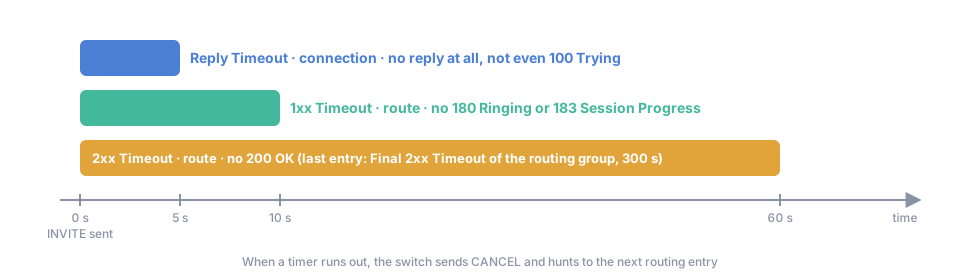
Every attempt to a vendor runs three timers. All three count from the moment the switch sends the INVITE.
- Reply Timeout, sec of the connection (default
5): the vendor has not answered at all, not even with100 Trying. - 1xx Timeout, sec of the route in the termination route (default
10): the vendor has not sent180 Ringingor183 Session Progress. - 2xx Timeout, sec of the route (default
60): the call has not been answered with200 OK. On the last entry of the routing group, Final 2xx Timeout, sec of the group (default300) replaces it, so the last chance may ring longer.
When a timer runs out, the switch sends CANCEL to the vendor and hunts to the next routing entry. A timer is used only when it is shorter than the ones after it: a Reply Timeout of 5 with a 2xx Timeout of 2 never fires, because the 2xx timer ends the attempt first. Independently of these timers, a SIP transaction with no reply at all ends after 32 seconds (RFC 3261), and the attempt fails with 408 Request Timeout.
When the 2xx timeout starts
Section titled “When the 2xx timeout starts”2xx Timeout Starts in System Management → SIP Features → SIP changes the starting point of the 2xx timer for the whole switch:
- When Vendor is Tried (default): the 2xx timeout counts from the INVITE. A vendor that is slow to start ringing has less time to get the call answered.
- When Vendor Sends 1xx: the 2xx timeout counts from the reply that ended the earlier timer:
180or183when the 1xx timeout was running, the first reply when only the reply timeout was. The callee always gets the full 2xx time to answer. If neither earlier timer is running, the count still starts at the INVITE.
Calls to your own accounts
Section titled “Calls to your own accounts”| Timer | Where | Default | Meaning |
|---|---|---|---|
| On-net Reply Timeout, sec, 1xx Timeout, sec, 2xx Timeout, sec | Routing group, shown when Use Connection is not [ Disabled ] | 5, 10, 60 |
The same three timers for on-net legs to your own accounts. See On-net routing |
| VM Timeout (sec) | Account, Voicemail tab | 30 |
How long the account rings before the call goes to voicemail |
| Follow Me Timeout, sec | Account → Follow Me | 15 |
In On No Answer and On Unavailable modes: how long the account rings before the Follow Me numbers are tried |
| Entry Timeout, sec | Account → Follow Me, per number | set per entry | How long each Follow Me number rings |
| Follow Me Timeout, sec | SIP Features → SIP | 15 |
The default when a user turns on Follow Me with a service code |
See Call forwarding and Follow Me.
During the call
Section titled “During the call”- Max Credit Time (sec) on the account (default
3600) is the longest a single call may last. The balance can end the call earlier. See Max session duration. - When the call’s media goes through the switch’s media relay, the switch ends a call when no RTP passes for 60 seconds. It then subtracts Media Timeout Corr., sec (default
60, in the billing system parameters) from the billed duration, so the customer does not pay for the silent minute. Without media relay the switch cannot see the media, and this timer does not apply.
Key terms
Section titled “Key terms”- Connection — a route to a vendor (SIP host, port, protocol, codecs) used by routing to send calls.
- Route — one candidate path for a call: a vendor connection with its priority and cost.
- Routing Group — a named set of routing rules assigned to a customer or account.
- Hunting — trying the next route after a failed attempt.
- Media relay — the switch passes the RTP of a call through itself instead of letting the endpoints exchange it directly.
Common scenarios
Section titled “Common scenarios”A vendor is down and every call waits before failover
Section titled “A vendor is down and every call waits before failover”A dead gateway does not reply at all, so the connection’s Reply Timeout decides: 5 seconds by default. A gateway that answers 100 Trying but never rings holds the call until the route’s 1xx Timeout, 10 seconds by default. Lower Reply Timeout, sec to 2 or 3 on connections that normally answer fast, and 1xx Timeout, sec on their routes to 5.
Calls fail after 2 seconds although the vendor would connect them
Section titled “Calls fail after 2 seconds although the vendor would connect them”The route’s 2xx Timeout is too short. It counts from the INVITE and wins over the longer reply and 1xx timeouts. Raise it to the time a callee needs to answer, 60 or more.
Mobile calls ring for a minute and then fail over
Section titled “Mobile calls ring for a minute and then fail over”The route’s 2xx Timeout of 60 ran out on an entry that is not the last one. Raise it on routes to mobile prefixes, or put the vendor last so that Final 2xx Timeout applies.
Calls drop after exactly one hour
Section titled “Calls drop after exactly one hour”That is Max Credit Time (sec) of the account. Raise it for accounts with long calls, for example call centres.